Android 16KB Page Sizes: Our Migration Rollercoaster
We thought it would take a morning. It took three weeks.
So Google drops this announcement: "Hey everyone, starting November 1st, 2025, your apps need to support 16KB page sizes. Should be easy!"
We were migrating Arheev, our intelligent HR platform's mobile app. We read the docs. Seemed straightforward. Update a few build tools, add some config flags, maybe grab a coffee while it builds. Done by lunch, right?
Narrator voice: It was not done by lunch.
What Google Wanted (And Why)
The basic idea makes sense. Android has been using 4KB memory pages forever, but modern devices with tons of RAM work better with 16KB pages. Google's own data shows some nice improvements:
- Apps launch 3% faster when your phone's memory is packed
- 4.5% less battery drain during startup
- Camera apps run 5–7% faster
- Your phone boots 8% quicker
Cool benefits! So what's the catch?
The Real Problem Nobody Warned Us About
Here's where it gets spicy. Every native library (.so file) in your app needs to be "aligned" to 16KB boundaries. Think of it like parking: your library needs to fit neatly into 16KB sized parking spaces.
If you're writing a pure Java/Kotlin app, you're golden. No native code, no problem.
But the Arheev mobile app is built with React Native. And React Native apps are basically native libraries wrapped in JavaScript wrapped in more native libraries wrapped in existential questions about why we didn't just build separate native apps.
When libraries aren't properly aligned, you get:
- Apps that refuse to install
- Cryptic error messages that tell you nothing
- Crashes that only happen on specific devices (usually the ones your boss is testing on)
Fun times!
What Actually Happened: A Timeline
Day 1: "This Will Be Easy"
We updated to Android Gradle Plugin 8.5.1 and NDK r28. The docs said these versions handle 16KB alignment automatically. We added some flags to AndroidManifest.xml:
<application
  android:enableOnBackInvokedCallback="true"
  android:extractNativeLibs="true">

  <property
    android:name="android.app.16kb_page_size"
    android:value="true" />
</application>
Build passed. Tests green. High fives all around. Time to celebrate our sub one hour migration!
Day 3: "Why Isn't This Working?"
We spun up an Android 15 emulator with 16KB support enabled. Installed the app. It crashed immediately.
Turns out, several libraries hiding in our dependency tree weren't 16KB aligned:
- Our audio processing library (libandroidlame.so)
- Some image compression thing
- A third party SDK we barely remembered adding
The error message? "Native module initialization failed." Thanks, Android. Super helpful.
We spent two days learning more about ELF alignment than we ever wanted to know.
Day 5: "Fine, We'll Work Around It"
After much Googling (and maybe some coffee fueled Stack Overflow diving), we found the magic flag: android:extractNativeLibs="true".
This tells Android to extract libraries when installing the app instead of loading them directly from the APK. It basically sidesteps the alignment requirement entirely.
Is it perfect? No. Does it work? Yes. Are we shipping it? Absolutely.
The Good:
- Fixed our crashes instantly
- Works with any library, aligned or not
- No waiting for third party developers to update their stuff
The Not So Good:
- Apps take a bit longer to install
- Uses more storage on the device
- Google might phase this out eventually (but that's future us's problem)
We're treating this as a temporary fix while we work with library maintainers to get proper 16KB aligned versions.
Day 7: "Let's Automate This Before We Forget"
The last thing we wanted was for someone to run expo prebuild and accidentally wipe all our hard earned configurations.
So we built an Expo config plugin that handles everything automatically:
AndroidManifest.xml changes:
- Adds the 16KB page size property
- Enables the back gesture callback
- Sets the extractNativeLibs flag
build.gradle updates:
- Configures NDK ABI filters
- Enables multidex support
- Sets up release signing
gradle.properties tweaks:
- Build tool settings
- React Native new architecture flags
- Resource optimization
Now when anyone on the team runs prebuild, all these settings just... work. No more "wait, where did that config go?" moments.
Things We Wish We Knew From Day One
1. Upgrade Everything First
Don't even think about starting this migration without Android Gradle Plugin 8.5.1+ and NDK r28+. Older versions just don't handle 16KB alignment properly.
Update your android/build.gradle:
dependencies {
  classpath('com.android.tools.build:gradle:8.5.1')
}
Yes, it's annoying to update build tools. Do it anyway.
2. Find Out If You Even Have Native Code
Before you panic, figure out if your app actually uses native libraries. The easiest way? Use APK Analyzer in Android Studio:
- Open Android Studio (any project works)
- Click Build > Analyze APK...
- Select your APK file
- Look for a lib folder
If you see a lib folder with .so files inside, congrats; you have native code to deal with. Check the Alignment column for any warning messages.
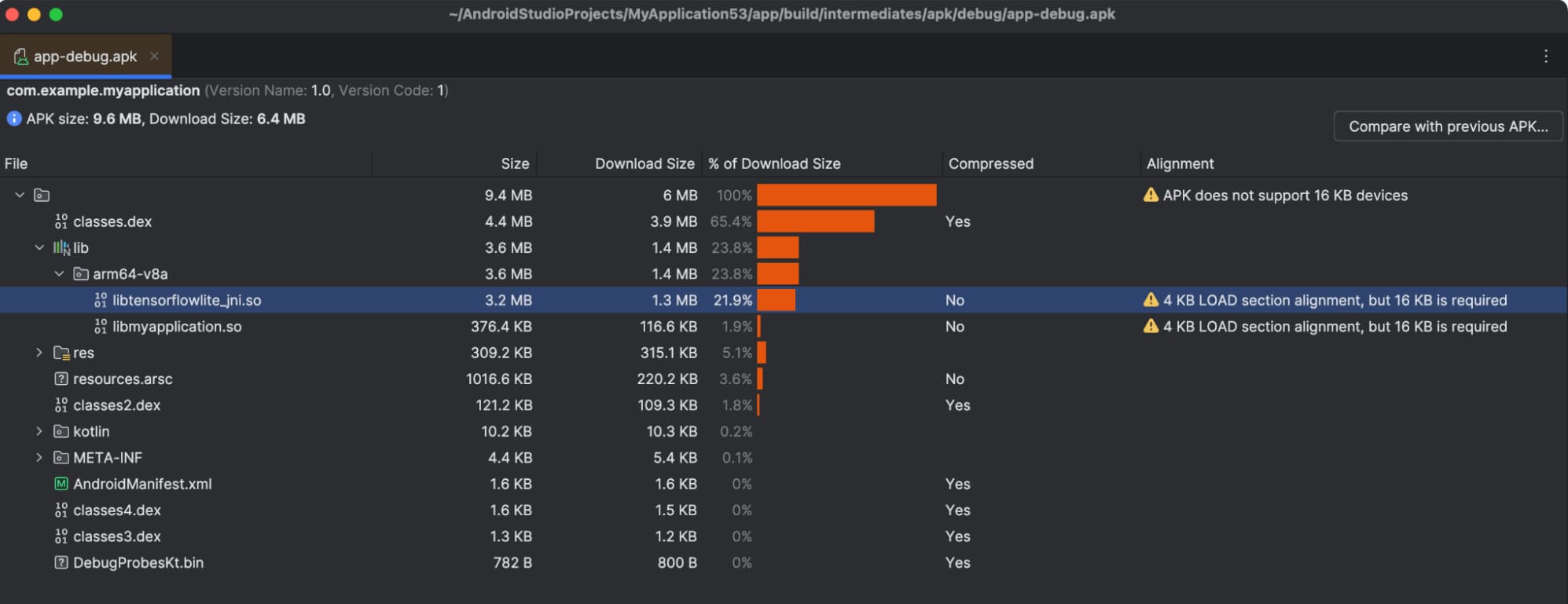
No lib folder? You're using pure Java/Kotlin and can probably skip most of this headache. Lucky you.
3. Actually Test on a 16KB Emulator
Create an Android 15 emulator in AVD Manager and enable "16KB page size" in the advanced settings. Your regular device won't catch these issues because it's still using 4KB pages.
Trust us, you don't want to discover alignment problems after shipping to production.
4. Hunt Down Your Native Libraries
Find all those .so files lurking in your app:
# List all native libraries in your APK
unzip -l app-release.apk | grep '\.so$'
Or just use APK Analyzer again; it's way easier and has a nice UI.
Make a list. Check if any are causing problems. Curse at the ones that are.
5. Keep Tabs on Your Dependencies
Not every library maintainer has jumped on the 16KB bandwagon yet. Some haven't even heard of it. For React Native:
- Check if your Expo SDK version has the fixes
- Browse GitHub issues for your native modules
- Consider switching libraries if the maintainer went AWOL
6. The extractNativeLibs Trick Is Temporary
Yeah, android:extractNativeLibs="true" fixes everything right now. But treat it like duct tape: it works, but you'll want a proper fix eventually. Keep track of which libraries need it and watch for updates.
Your Migration Checklist (So You Don't Miss Anything)
Here's what you actually need to do:
- Update AGP to 8.5.1+ and NDK to r28+
- Update Gradle to 8.14+ (might as well)
- Use APK Analyzer to check if you have native libraries
- Add the 16KB page size flags to AndroidManifest.xml
- Set up NDK ABI filters in build.gradle
- Add extractNativeLibs if you're hitting crashes
- Create an Android 15 emulator with 16KB enabled
- Actually test everything (don't just assume it works)
- Make a list of problematic libraries
- Automate your config (future you will thank you)
The Reality of Cross Platform Development
Here's the thing about platform requirements like this: they don't just affect your code. They affect every single library in your dependency tree.
When Google says "support 16KB," every native module developer, every SDK provider, every community package needs to comply. And your migration is only done when the slowest library finally catches up.
React Native makes this extra fun because you're not just waiting on one ecosystem; you're waiting on native iOS developers, Android developers, and JavaScript developers all coordinating. It's like herding cats, except the cats are also juggling.
Was It Worth It?
After all that work, did we actually see improvements?
Yeah, we did:
- Less memory fragmentation on newer devices
- Slightly faster app starts (hard to measure exactly, but it's there)
- No more "your app doesn't work on my phone" bug reports from Android 15 users
The extractNativeLibs workaround makes installation a bit slower, but once the app's running, everything feels fine.
What's Still Not Perfect
We're still using extractNativeLibs="true" instead of properly aligned libraries. This works, but it's technically a workaround, not a solution.
A few dependencies still haven't released 16KB-aligned versions. We're watching their GitHub issues, but some haven't been updated in months. Might need to fork them eventually or find alternatives.
And we're not 100% sure how this will perform on actual 16KB devices once they're common. Emulators are one thing, real hardware is another. We'll find out.
What's Next?
More of the same, probably. As Android phones get more powerful, platform requirements will keep cascading through dependency trees. The automation we built for this migration will get used again on the next one.
The Bottom Line
Migrating to 16KB page size support isn't optional if you want to ship on Google Play. And it's definitely more involved than the documentation makes it sound.
But once you get through it, you're good. The config mostly runs itself, your app performs better on newer devices, and you have one less deadline to stress about.
If you're in the middle of this migration right now and running into weird issues, you're not alone. We've been there. Feel free to reach out if you want to commiserate about library alignment or swap war stories about cryptic Android error messages.
Useful Links If You're Diving In
- Android 16KB Page Size Docs: The official documentation (which makes it sound way easier than it is)
- Android Gradle Plugin Release Notes: For checking what version you need
- Expo Config Plugins Guide: If you're using Expo and want to automate this mess
Unlike most migrations, this one actually has a deadline. But at least you don't have to do it alone; every React Native developer is going through the same alignment nightmares.